Fitpro
专业智能健身应用,助您实现健康目标
欢迎使用 FitPro
欢迎使用FitproApp!这是一款用于连接和管理智能手环设备的app应用。它能帮你解锁手表的全部潜能、记录健康数据、定制设备表盘、接收来电消息通知等,请跟随本指南,快速完成设置并尽享便捷。
下载App并注册登录
1. Download and install the latest version of Fitpro App on your phone. You can scan the QR code below or on your device, or search for Fitpro in the app store/App store.
2. You can register an account or choose a login method on the page. New users generally need to register first, follow the app's instructions to correctly register an account and log in, or you can choose to skip first.
Note: When installing the app, it needs to access some phone permissions. Please click allow to avoid affecting the use of the app.
开始使用:快速配对你的设备
准备工作
• Turn on your phone's Bluetooth function.
• Ensure your device (such as bracelet) has sufficient battery power.
开始配对
1. Open the App, click Settings at the bottom of the homepage - click Bind Device - search for bracelet, click the corresponding Bluetooth name to bind.
2. App auto scan: Click Bind Device - Search bracelet - click Scan QR code in the upper right corner to automatically bind.
3. Pairing reminder, permissions need to be allowed: To ensure that message notifications, health monitoring and other functions work properly, please be sure to allow all requested permissions.
4. Android/iOS system requirements: Android 8.0 and above; iOS 9.0 and above.
苹果设备配对连接
智能手环与苹果 App 第一次连接好以后会提示"蓝牙配对请求",请点"配对"完成连接,配对后允许显示通知:查看蓝牙设置是否有连接,进入检查系统共享通知是否打开,智能手环才能接收来自 iOS 系统推送的来电、短信、QQ、微信等通知提醒,否则无法接收提醒。
安卓设备连接
安卓系统需要在手机管家或系统的设置里面,下载好app需要读取联系人信息等所有通知权限和手机设置中赋予APP后台运行。(打开 APP 的自启动、高耗电保护、白名单等,关闭手机省电模式,否则 app 会被系统清掉,断开和智能手表的连接。
如配对失败?
• Restart your phone's Bluetooth and your smart device.
• Ignore existing device records in your phone's Bluetooth list and rescan.
• Check if the device has been bound to another phone and needs to be unbound first.
数据总览-首页
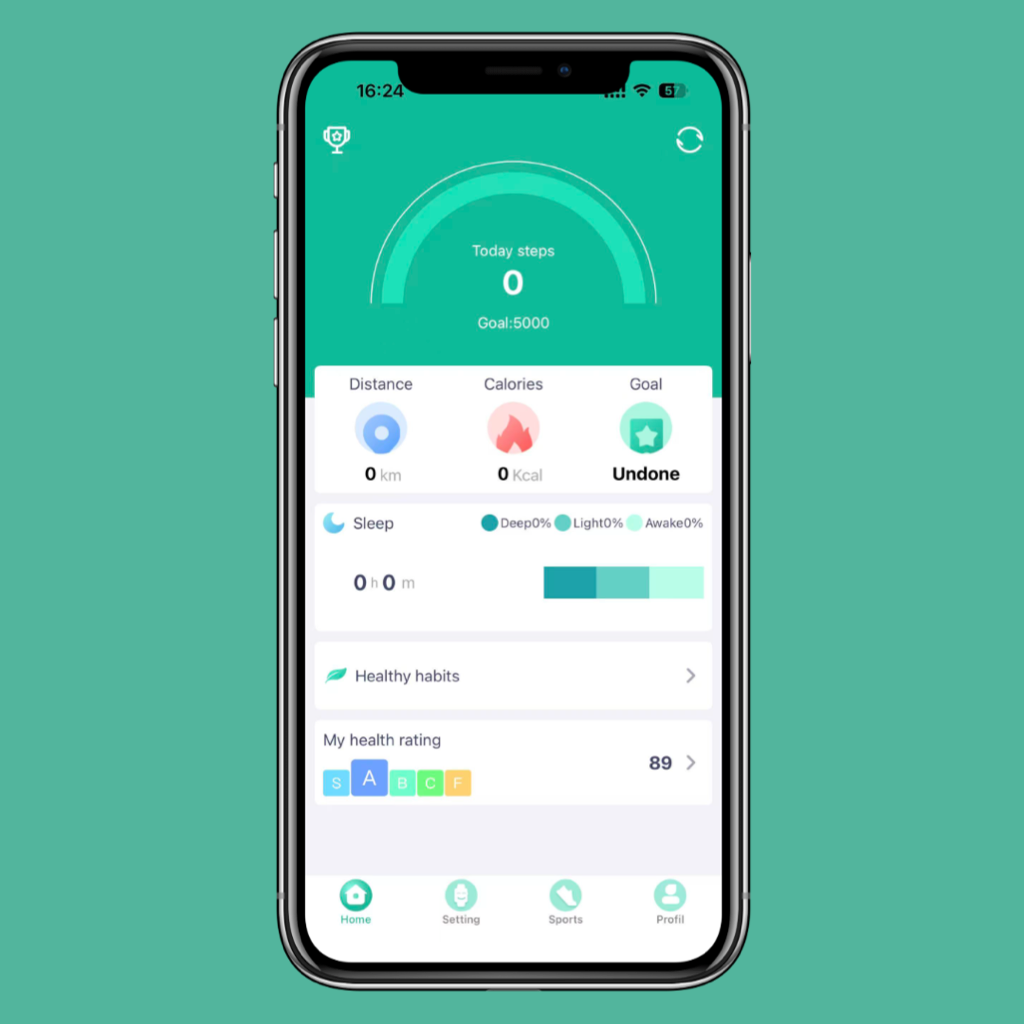
Homepage clearly displays your detailed data such as total steps, calories burned, heart rate, sleep, ECG, and healthy habits.
Total steps: Displays today's total steps. Click to view daily, weekly, and monthly total steps, total distance, and total calories.
Heart rate: Displays current, highest, and lowest heart rate values and heart rate curve. Click to measure and view past heart rate records. (Note: Monitoring results are for reference only and cannot be used as medical diagnosis evidence)
Sleep: Displays sleep situation when worn. Click to view detailed sleep duration and structure chart (such as deep sleep, light sleep, awake duration).
ECG: Displays current ECG value and ECG curve. Click to start measuring and view ECG curve chart. (Note: Monitoring results are for reference only and cannot be used as medical diagnosis evidence)
Healthy habits: Log in to your account and record your various habits such as diet, exercise, drinking water, sleep and others. You can add and delete habits. By clocking in daily, you can see the number of days you've persisted and the leaderboard.
My health rating: Enter height, weight and other information to evaluate health index and body index, such as BMI and body fat rate.
Note: Data synchronization: The App will automatically synchronize device data. You can also manually pull down the homepage and click the sync icon to force a refresh.
核心功能详解-设置
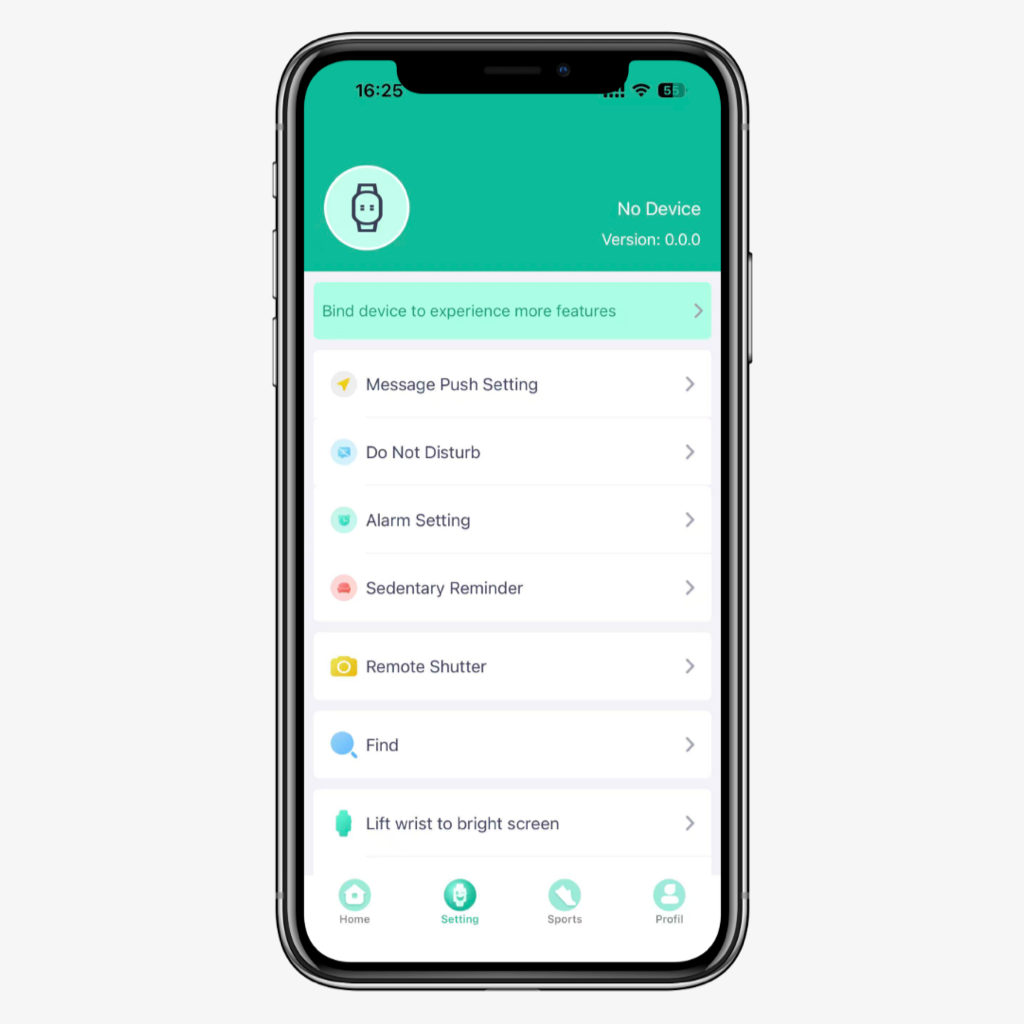
Settings: After successful pairing, click the settings card on the App homepage to enter the detailed settings center.
App push: Manage various App message pushes on your phone (calls, WeChat, SMS, QQ and other chat apps), and select the apps that need to be pushed.
Bracelet alarm clock: Set alarm reminders according to different time management. Up to 8 alarms can be set, and offline alarms are supported. After successful synchronization, even if the APP is not connected, the bracelet will remind you at the set time.
Sedentary reminder: After enabling the reminder, the system will remind you once per hour during the set time period. You can set the start and end time.
Remote camera: When connected, start taking photos from the bracelet or enter the remote camera page in the app. Shake/wrist flip/touch the bracelet, and it will automatically take a photo after a 3-second countdown. Please allow the app to access the album to save selfies.
Find device: Bind the device and click find. The corresponding device will have a response prompt.
Lift to wake screen: After turning on, the screen will automatically light up when you make a flip motion. Note: Turning on this function will shorten the normal usage time of the device.
Frequent contacts: You can add frequently used contact phone numbers to sync to the bracelet. Up to 8 can be added.
Dial settings: Change different types and themes of dials. A wide variety of styles are available, and you can also select custom dials to upload from the album.
Device reset: This function will clear some data of the bracelet (such as step counting, heart rate)
Unbind: Unbind from the device, all data on the device side will be cleared.
Other functions: Set vibration switch. (Note: Some devices do not have vibration function)
OTA upgrade: When there is a version that needs to be updated on the device side, click OTA to upgrade to the latest version
运动模块
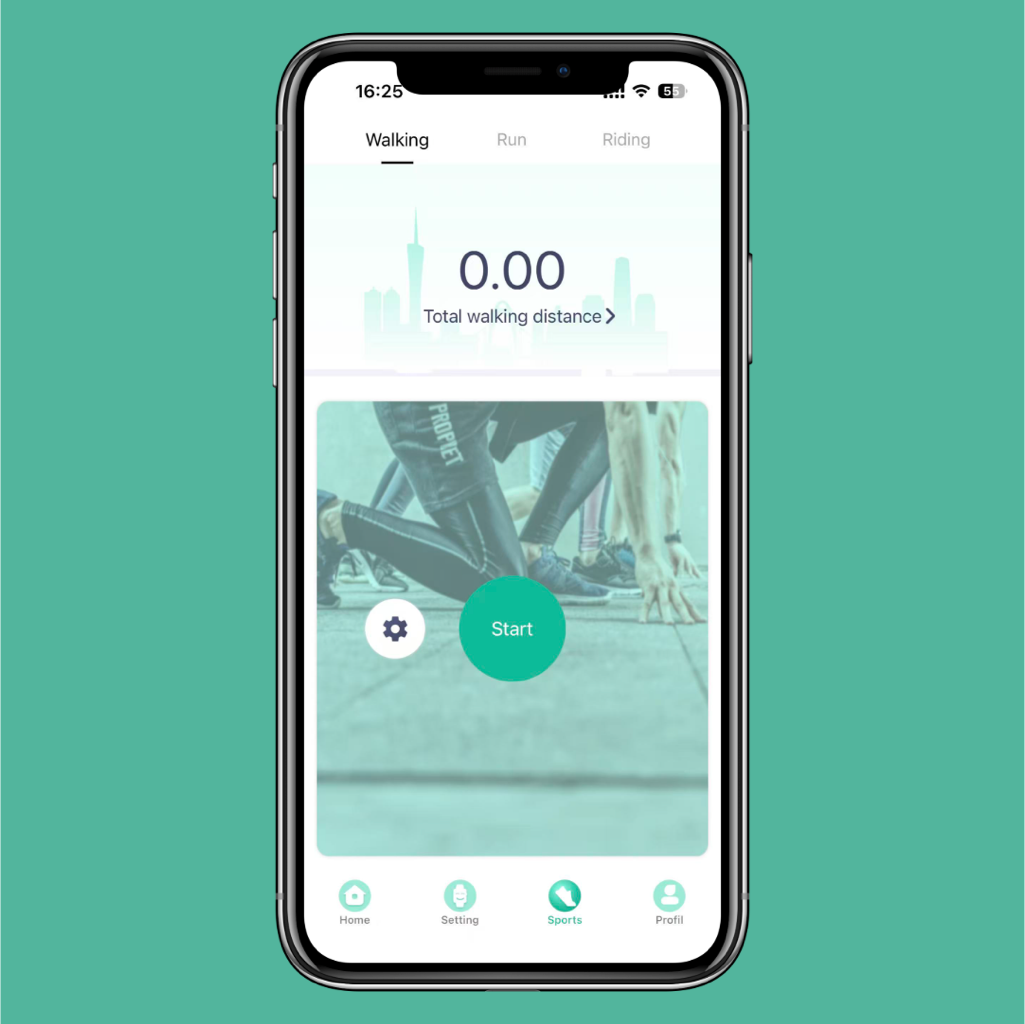
Walking: Display the total mileage of walking. When starting to walk, it will record the current average pace, total time, calories burned and walking trajectory. Click to enter the details to view the walking kilometers, calories burned, total time and cumulative times per week, month, and year.
Running: Display the total mileage of running. When starting to run, it will record the current average pace, total time, calories burned and running trajectory. Click to enter the details to view the running kilometers, calories burned, total time and cumulative times per week, month, and year.
Cycling: Display the total mileage of cycling. When starting to cycle, it will record the current average pace, total time, calories burned and cycling trajectory. Click to enter the details to view the cycling kilometers, calories burned, total time and cumulative times per week, month, and year.
Note: This function does not require device binding. You can use it by logging in to your account.
我的
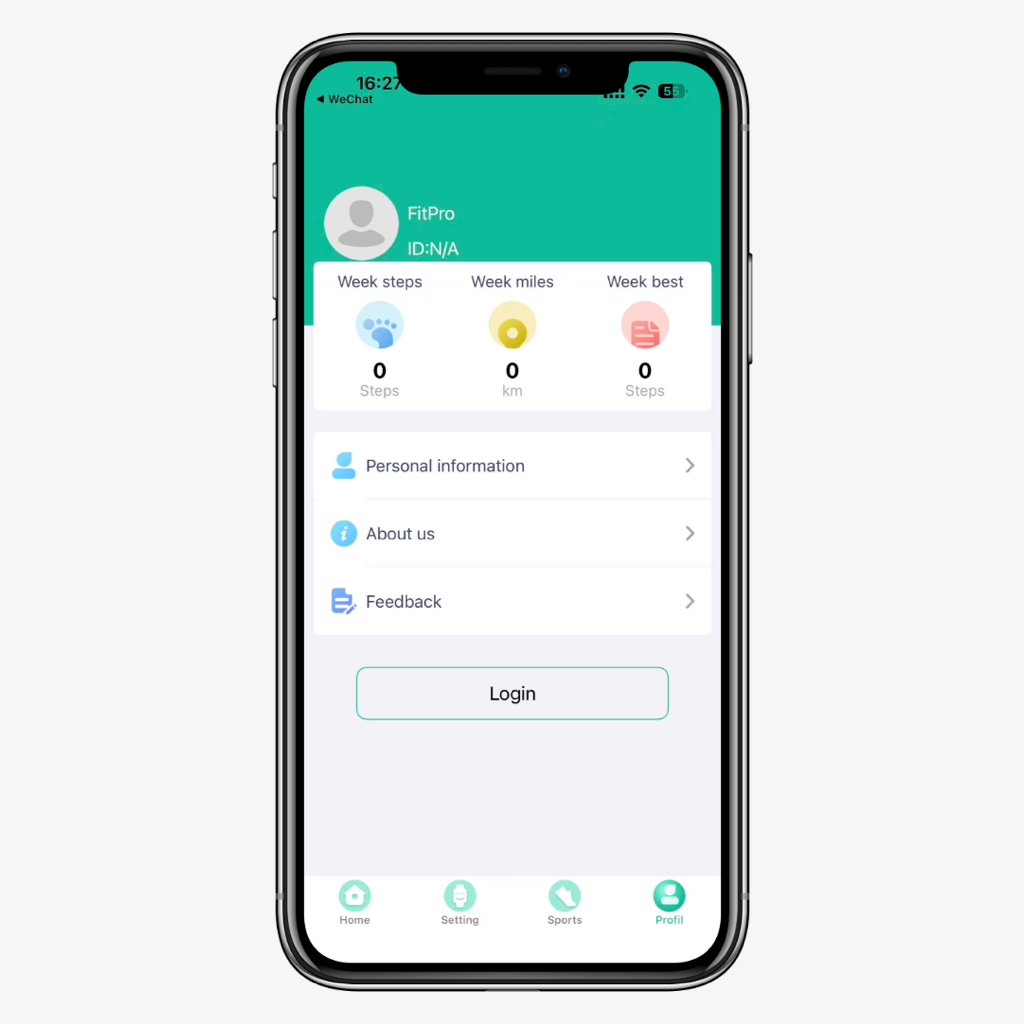
Display this week's steps, mileage and this week's best record.
Personal information: Log in to your account and set personal information. Click "My" > avatar to set height, weight, age, and step goals and exercise goals for the bound device to make health data more accurate.
About us: View the app version number and share the QR code with friends to download the app.
Feedback: If you have valuable opinions about the app, you can give direct feedback to help us improve better.
解绑
安卓设备解绑:在 app 的设备点击解绑即解除智能手表和 app 的连接。
苹果设备解绑:在 app 的设备点击解绑即解除智能手表和 app 的连接;进入手机的设置 - 蓝牙,点按蓝牙设备后面的感叹号,在弹出的对话框中点选忽略设备,即可完全解除智能手表连接。
技术支持与帮助
固件更新:当App提示有固件更新时,请确保设备电量充足(>50%)并在手机网络稳定的环境下进行更新。
获取帮助:如需更多帮助,请点击「我的」->「意见与反馈」
Fitpro App是你与设备之间的桥梁,正确使用它能让你更好地了解自己,迈向更健康、高效的生活方式。
App信息
•兼容性:请确保你的手机操作系统(iOS/Android)版本符合要求。
•更新:为获得最佳体验,请保持App为最新版本。